ConsoleLink is an app to communicate with a SmartFade ML lighting console, from ETC. This console does not have an external display output (ex. HDMI or VGA), but it can be connected to a computer by USB.
The original companion software, named SmartSoft, was supported on macOS up to Yosemite (10.10), and also Windows 10. SmartSoft for Mac cannot even open on newer macOS. The Windows version can run on Mac via the CrossOver app, but only in offline, without any communication to the console possible.
I wanted to connect to the console on my recent mac (Apple Silicon), and get a live view off all the outputs. My console being old, some blue LEDs need to be replaced (known HW issue) and so this is particularly important for me to see what is going on on the console.
So I built ConsoleLink to handle the USB connection to the console, and serve a local web app, that can be accessed from the same computer, or from the local network, using simply a web browser. While developed and tested on macOS, the server should be able to run on Linux and Windows as well (not tested). The client side is just a web app, so it should run on all platforms (tested with Safari on macOS and iOS).
App design
ConsoleLink is split into three parts: a protocol library, a terminal tool and a web app. The console view is read-only for now: ConsoleLink shows what the console is doing, it doesn’t control it.
What was built now is actually just a fraction of what the original software SmartSoft was able to do. I covered mostly the “Playback” tab of SmartSoft, and not entirely.
Backend
The protocol library (protocol.py) finds the console on USB, claims its bulk interface, and speaks its wire protocol.
The console never sends anything on its own: the host polls it with a small 12-byte header, and the console replies with a header of its own, followed by a payload when it has one.
When a control changes, the console first sends an “announce” naming which kind of data is ready. The host has to acknowledge it, and only then does the real data arrive.
The library decodes the message types needed for the live view: faders, buttons, intensity levels.
On top of it, 2 tools:
listen.pyis a small terminal tool that prints every control change live.server.pyis the web app: a background thread polls the console over USB, and a plain Python HTTP server pushes every decoded change to the browser using Server-Sent Events. It listens on the local network, so a phone or a tablet can open the page too. If the console is unplugged and plugged back in, the server reconnects on its own.
Frontend
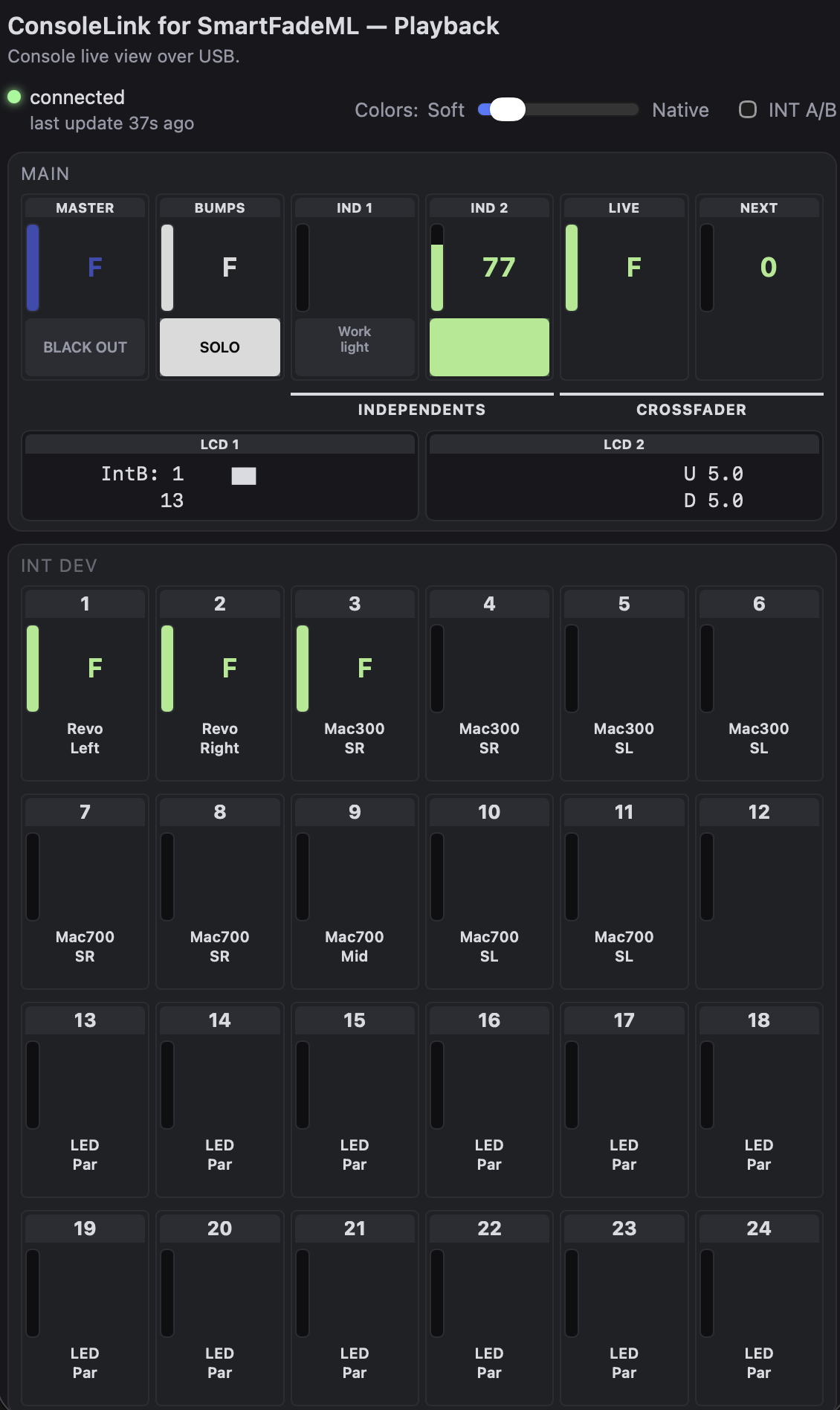
The web page is a single static HTML page with vanilla JavaScript and CSS, no framework and no build step. It shows the Master, Bumps, Independents, Crossfaders and a mirror of both LCDs, then the INT A, INT B and INT DEV intensity rows, and the 24 physical faders with their Bump LEDs. The layout is dynamic and on a phone, or if the view is very narrow, each row wraps to 6 columns.
Tests
The tests replay real traffic recorded from the console, so they run without the console connected. The expected values come from what the console itself showed at the time, not from what the decoder returns.
Note that the traffic in question we record and replay for the tests is the Console -> Computer traffic over USB, not the Console -> Fixtures traffic over DMX. This could be an interesting separate project.
# Byte-exact excerpt of real console traffic -- regenerated, don't hand-edit.
# Independent 1/2 (type=0x0c) at rest, then each one's button pressed in turn.
# IND 1 is named "Work light" at level 73; IND 2 is unnamed at level 196.
# @both_off: Neither pressed.
t=   0.217 requested type=0x0c len=85 raw=020049000103060057006f0072006b00000000006c0069006700680074000000000000000000000000000000c400010306000000000000000000000000000000000000000000000000000000000000000000000000
# @ind1_on: IND 1 pressed.
t=   2.915 acked    type=0x0c len=85 raw=020149000103060057006f0072006b00000000006c0069006700680074000000000000000000000000000000c400010306000000000000000000000000000000000000000000000000000000000000000000000000
# @ind2_on: IND 2 pressed.
t= 6.924 acked type=0x0c len=85 raw=020049000103060057006f0072006b00000000006c0069006700680074000000000000000000000000000001c400010306000000000000000000000000000000000000000000000000000000000000000000000000Challenges
There is no public documentation for the console’s USB protocol, so it had to be reverse-engineered. I ran the original SmartSoft on Windows 10, connected to the console, and captured the USB traffic with Wireshark. Each capture isolated a single action (connecting, moving one fader, pressing one button…), so the traffic could be matched to what happened on the console.
A few things were harder than expected, like figuring out how the console sends the names for all devices and the LED colors and blinking info. The MEMS mode was also harder to understand, vs INT A/B/DEV, as it has a sytem of pages (12 pages of 24 memories).
Tech Stack
- Python 3, with the standard library only for the web server
- pyusb and libusb for the USB connection (no vendor driver needed)
- Server-Sent Events to push live updates to the browser
- HTML, CSS and vanilla JavaScript for the web page
- pytest for the tests
- Wireshark and USBPcap to capture the original software’s USB traffic
AI Workflow & thoughts on AI assisted dev.
I consider myself still new to AI assisted development. For this project, I took a Claude plan and used it extensively, mostly from VSCode. It has been invaluable for many aspects: from the USB layer reverse engineering, to the user facing web app. On the other hand, reading code rather than writing it is a very different way of working, and I think it takes away some of the experience and joy of coding.
The speed at which Opus 5.5 can generate lines of code is clearly faster than my ability to read it. So my method was to read the diff of the previous prompt while running “Plan” mode for the next prompt. I did not use multiple instances in // as I was already the bottleneck.
Moving faster would have been totally possible, the trade-off being giving up on reading all the code, and loosing control over the code. As I am doing this project mostly to learn and grow, that would not make any sense in my opinion.
I read all the diff, iterated on each sub-feature, and all commits were done manually. This app, in the first version released on September 24th, 2025, took about 3 weeks of full-time work.
Next Steps
- Writing to the console. That part of the USB protocol was not decoded yet.
- Showing the Cuelist in the web app. The messages are not fully decoded yet, so it may require more captures traces first. But that is maybe the best next feature to add to make it easier to run a show using the SmartFade ML.
- Connecting ConsoleLink to other software/protocols in the Stage Lighing ecosystem: like Capture for visualization while preparing a show, or adding Open Sound Control (OSC) support without the need to use the MIDI interface.
License
ConsoleLink is open source, under the MIT license.