pico8-r1 packages a PICO-8 cartridge as a Rabbit R1 “Creation”: a folder of static web files, plus the QR code you scan on the R1 to install it.
The Rabbit R1 is a cute little orange brick, but honestly not a very useful one. It has a 240-pixel-wide touch screen, a scroll wheel and a side button. Creations are the web-based mini-apps you can make for it, running in its built-in WebView. PICO-8 can export any game as an HTML + JavaScript web player, so the two looked like a good match: a tiny fantasy console on a tiny device.
The Creation is just a repackaging of PICO-8’s own web export, with the player itself left unchanged. It installs on a stock R1, with no custom firmware or rooting. In the games I tested, it runs at a steady ~60 fps.
One command does the whole job:
python3 pico8_to_r1.py cart.p8 --title "My Game" --base-url https://example.com/games/mygame/The cart can be a .p8 source file or a .p8.png as distributed on the PICO-8 BBS. You then upload the contents of dist/ to that HTTPS URL, and scan dist/qr.png with the R1’s Creations scanner.

--fps readout on).How it works
The packager is a single Python script, using only the standard library:
- It runs your own licensed copy of PICO-8 headless (
pico8 -export) with a custom HTML template, so the exported player comes out already fitted for the R1 screen. - It cuts the R1 Creation icon from the cart’s label.
- It writes the Creation manifest (title, URL, description, icon, theme color) and encodes it as the install QR code.
Pillow and qrcode are optional: without them, the script skips the icon and the QR code.
Controls
The custom template adds touch controls and maps the R1 hardware to PICO-8 buttons:
- touch d-pad and O/X buttons, with multi-touch
- scroll wheel = up/down (or left/right in landscape)
- side button = O
- hold the side button = pause menu
Under the hood, the controls write directly into pico8_buttons[0], the bitfield the PICO-8 web player reads for btn() and btnp(). I first tried synthesized keyboard events, but they did not register, and the bitfield turned out to be simpler and more reliable.
Two layouts are available: by default the controls sit in their own strip under the game, and --layout overlay draws them over the game for a bigger picture.
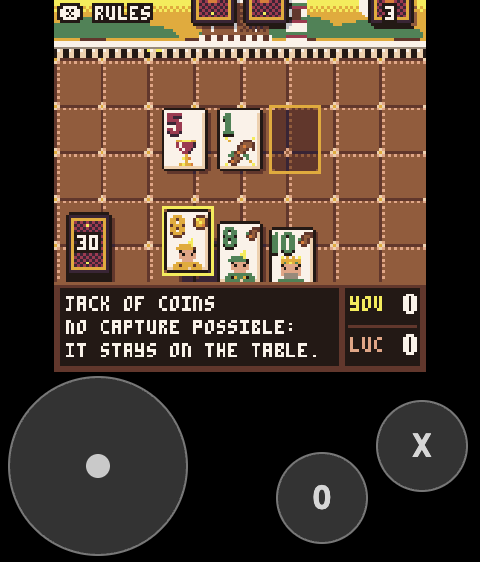
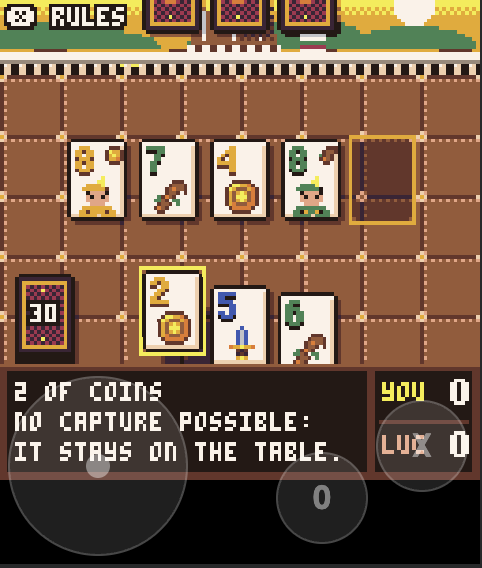
--layout overlay (right).There is also a landscape mode (--orientation landscape), for holding the R1 sideways with the wheel at the bottom: the page is rotated a quarter turn, with the d-pad in the bottom-left corner and O/X in the bottom-right, over a full-height game.

Challenges
The R1’s input events are not really documented, so I wrote a small probe page (tools/probe.html) that logs every event it receives, hosted it, and installed it on the R1 like any other Creation. That gave me the real names: scrollUp / scrollDown for the wheel, sideClick for the side button, and longPressStart / longPressEnd for a hold.
If the wheel scrolls in the opposite direction to what you expect for a particular game, you can add --invert-wheel to swap the direction.
Everything verified on the real device is written down in docs/r1-findings.md.
After playing with a few games, I found it hard to be accurate with the tiny touch controls, so this works best for slow, casual games (card games, puzzles, etc.). A physical keyboard would probably help with action games and platformers.
The other constraint is distribution: as far as I know, Creations cannot be side-loaded, so the files have to be served over HTTPS from somewhere the R1 can reach, and the QR code has to point to that URL.
Reception and what’s next
I first shared it on r/pico8 as a screenshot only, with the script still on my machine, saying I would publish it under the MIT license if there was interest. There was, so I cleaned up the README, added the landscape mode, and put it on GitHub. It is still very alpha.
My favorite comment summed up the R1 pretty well: “That’s the best use of that hardware ever. Still a terrible product. But you made it better.”
A possible next step is a game designed around the R1’s scroll wheel: it is a fairly unique controller, and PICO-8 games currently only see it as up/down.
Tech Stack
- Python 3.8+ (standard library), with optional Pillow and qrcode
- PICO-8 0.2.x headless web export, with a custom HTML template
- Vanilla JavaScript for the touch, wheel and side button input bridge
- Rabbit R1 Creations (WebView, JSON manifest in a QR code)
Only tested on macOS, but since it is plain Python, it should work wherever the PICO-8 app works.
License
pico8-r1 is open source, under the MIT license. PICO-8 itself is a commercial product by Lexaloffle; you need your own licensed copy to export games.